A great photograph does not necessarily become a great print just because it is sent to a printer. The details captured by the camera, the colors adjusted during editing, and the quality of the final print all depend on how well the printer can translate the digital image onto paper.
Think about the last photograph you edited. Did the colors on your monitor look slightly different from the printed version? Did a deep black appear gray, or did a subtle skin tone lose some of its detail? These differences can happen when the printer, ink, paper, and color-management workflow are not properly matched.
So, what should photographers actually look for when choosing professional photo printers?
The answer isn’t simply the printer with the highest resolution or the largest number of features. A photographer should consider the complete printing workflow, including color accuracy, print resolution, ink technology, paper compatibility, print size, ICC profiles, speed, connectivity, and print durability.
Let’s look at the factors that matter most.
What Makes a Printer Suitable for Professional Photography?
Before comparing individual printer specifications, it helps to understand what separates a professional photo printer from a general-purpose office printer.
A standard office printer may be designed primarily for documents, reports, and everyday business materials. A professional photo printer, on the other hand, is designed around the reproduction of detailed images, gradients, colors, and tonal variations.
For photographers, important characteristics can include:
- High-quality image reproduction
- Accurate and consistent colors
- Smooth tonal transitions
- Fine detail
- Support for specialized photo media
- Appropriate print sizes
- Reliable ink delivery
- Consistent results across multiple prints
This doesn’t mean every photographer needs the most advanced printer available. A wedding photographer producing albums may have different requirements from a fine-art photographer producing large exhibition prints.
How Important Is Print Resolution for Photo Printing?
Print resolution is one of the first specifications photographers often notice, but it shouldn’t be considered in isolation.
Resolution refers to the printer’s ability to place tiny amounts of ink onto the printing surface to reproduce image details. Higher resolution capabilities can help produce fine details, smooth edges, and more refined transitions when the printer, ink, paper, and image are properly matched.
Resolution becomes particularly important for:
- Fine-art photography
- Detailed architectural photographs
- Landscape photography
- Product photography
- Portraits
- High-resolution commercial images
However, simply choosing a printer based on the largest resolution number doesn’t guarantee a better photograph.
The source image, viewing distance, paper quality, ink system, and image-processing workflow all contribute to the final result.
For photographers who frequently print highly detailed images, resolution should therefore be considered alongside color accuracy, ink technology, and media compatibility.
Why Does Color Accuracy Matter to Photographers?
Imagine photographing a product where the exact color is important for a client’s brand. If the printed version looks noticeably different from the original image, the printer has failed to reproduce an important part of the photograph.
Color accuracy is especially important for:
- Portrait photographers
- Commercial photographers
- Product photographers
- Wedding photographers
- Fine-art photographers
- Advertising and branding projects
A professional workflow aims to make the transition from the digital image to the physical print as predictable as possible.
This is where color management becomes important.
Photographers should consider whether the printer supports a workflow involving appropriate color spaces, printer profiles, paper profiles, and other color-management tools.
How Does Color Management Affect Professional Photo Printing?
A printer doesn’t work independently from the rest of the photography workflow.
A typical workflow may look something like:
Camera → Editing Software → Calibrated Monitor → Color Profile → Printer → Ink + Paper → Final Print
If one part of this chain behaves differently from the others, the final result can change.
For example, a photographer may carefully edit an image on a calibrated monitor, but use an unsuitable printer or paper profile when printing. The resulting image may have differences in saturation, contrast, or color balance.
A good color-management workflow can involve:
- Monitor calibration
- Appropriate color spaces
- ICC profiles
- Printer profiles
- Correct paper profiles
- Consistent printer settings
- Suitable viewing conditions
A quick question for photographers
Before blaming the printer for inaccurate colors, ask:
Is the monitor calibrated?
Is the correct ICC profile being used?
Is the correct paper selected in the printer settings?
Is the print being viewed under suitable lighting?
If the answer to several of these questions is no, changing the printer may not solve the entire problem.
What Are ICC Profiles and Why Do They Matter?
ICC profiles are an important part of professional color management.
An ICC profile provides information about how a device or particular printing setup handles color. This can help software understand how colors should be interpreted or converted between different stages of the workflow.
For photo printing, profiles may be associated with:
- Monitors
- Printers
- Paper
- Ink
- Specific printer-and-media combinations
This is especially useful because different types of photo printing paper can produce different results.
A glossy paper may reproduce colors and contrast differently from a matte fine-art paper, even when exactly the same image and printer are used.
Therefore, photographers should consider the printer and paper as a combined system rather than evaluating the printer separately.
How Does the Ink System Affect Photo Quality?
Ink plays a major role in the appearance and longevity of a photographic print.
Professional photo printers may use multiple ink channels rather than relying only on the basic cyan, magenta, yellow, and black combination found in many general-purpose printers.
Additional ink colors can help the printer reproduce a wider range of tones and make subtle transitions smoother.
Depending on the printer, photographers may encounter different ink configurations designed to improve areas such as:
- Black density
- Skin tones
- Neutral gray reproduction
- Shadow detail
- Highlight transitions
- Overall color gamut
For photographers, photo printer ink should therefore be considered part of the overall printing system.
The ink also needs to work appropriately with the selected paper. Using a high-quality ink system with unsuitable media may still result in inconsistent output.
Does the Type of Photo Paper Really Matter?
Yes. Paper is not simply a surface onto which the printer puts ink.
The characteristics of the paper can influence how colors, contrast, sharpness, and texture appear in the final photograph.
Photographers commonly choose between different types of media depending on the intended result.
Glossy Photo Paper
Glossy media can produce:
- Strong contrast
- Vibrant colors
- A smooth surface
- A more reflective appearance
It can work well for certain portraits, commercial photographs, portfolios, and colorful images.
Matte Photo Paper
Matte media generally provides a less reflective surface and can be useful when photographers want a softer or more subdued presentation.
It can be particularly appropriate for:
- Fine-art photography
- Exhibition prints
- Black-and-white work
- Images intended for controlled viewing environments
Neither option is universally better.
The right paper depends on the image and the way the photographer wants the finished print to look.
How Important Is Print Size?
The ideal printer also depends on the size of the photographs you need to produce.
A photographer who primarily produces standard-sized prints may not need a large-format device. Someone producing gallery artwork, exhibition prints, or large commercial photographs may need considerably larger printing capabilities.
When evaluating large format printers, photographers should consider:
- Maximum printable width
- Supported paper sizes
- Roll or sheet media
- Borderless printing options
- Media handling
- Print resolution
- Ink capacity
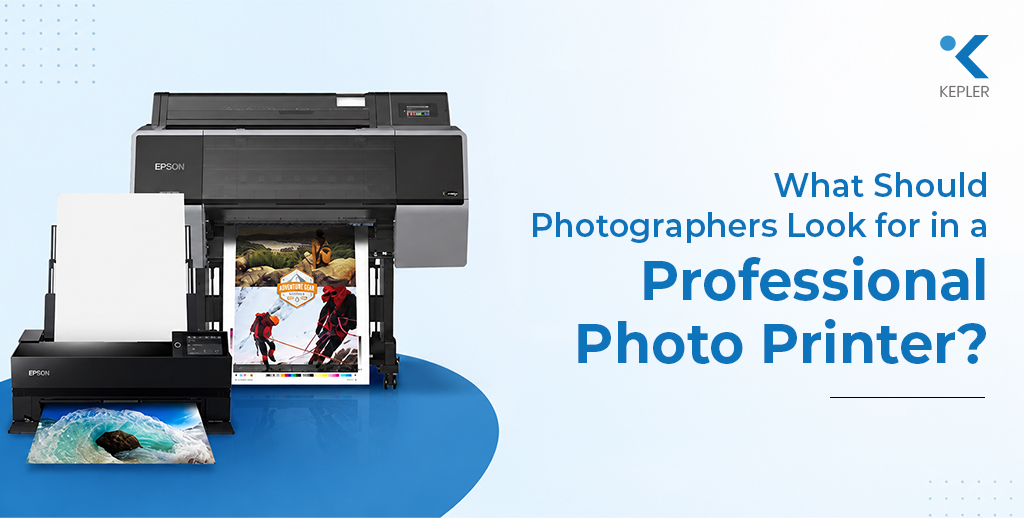
For example, Epson’s SureColor range includes professional photo printing equipment. The Epson SC P900 Photo Printer can be used as an example when discussing printers intended for photographers who require detailed, high-quality photographic output.
The important point is to match the printer’s maximum output size with the photographer’s actual requirements rather than selecting a large printer simply because it offers a larger format.
Potography portfolios
Portrait prints
Event photographs
Marketing images
Photo albums
However, borderless printing availability can depend on the printer model, paper size, and selected media.
Photographers should check the supported sizes and media before assuming that every paper type can be printed borderlessly.
How Does Print Speed Matter in Professional Photography?
Print speed may not be the first priority for a fine-art photographer producing only a few exhibition prints. However, it can become much more important for photographers handling larger orders.
Consider a photographer printing:
- Wedding photographs
- School photographs
- Event images
- Photo booth images
- Commercial photography
- Client proofing sets
When dozens or hundreds of prints need to be produced, print speed can have a noticeable effect on workflow efficiency.
However, speed should be balanced with quality.
A photographer should ask:
Do I need the fastest printer, or do I need a printer that produces the required quality consistently within my workflow?
For many professional photographers, consistent output may be more valuable than simply maximizing pages per minute.
What Should Photographers Know About Ink Consumption?
Ink consumption affects both operating costs and workflow planning.
Two printers may produce photographs of similar size while using different amounts of ink depending on their ink systems, print settings, image coverage, and media.
Photographers who print frequently should consider:
- Ink cartridge capacity
- Number of ink channels
- Estimated ink usage
- Replacement costs
- Availability of individual cartridges
- Frequency of cartridge replacement
- Maintenance-related ink usage
Looking at the initial printer price alone can therefore be misleading.
A more useful approach is to consider the total cost of producing photographs over time.
How Important Is Connectivity for a Photo Printer?
Modern photography workflows often involve multiple devices.
A photographer may edit photographs on a workstation, transfer files from another computer, or work within a studio where several people need access to the printer.
Depending on the printer, connectivity options may include:
- USB
- Ethernet
- Wi-Fi
- Network printing
- Mobile or cloud-based workflows
For a single photographer working from one computer, basic connectivity may be enough.
For a professional studio with multiple users, network connectivity can make printing more convenient and easier to manage.
What Should Photographers Consider When Choosing a Professional Photo Printer?
Instead of choosing a photo printer based on one specification, photographers can use a broader checklist.
Before purchasing, consider:
- What size photographs do you normally print?
- How many prints do you produce each month?
- Do you primarily print color, black-and-white, or both?
- Do you need borderless printing?
- Which types of paper do you regularly use?
- How important is color accuracy?
- Does your workflow use ICC profiles?
- What ink system does the printer use?
- How much does replacement ink cost?
- Do you need wireless or network connectivity?
- How important is long-term print durability?
- Do you need a standard or large format printer?
This approach helps photographers focus on their actual workflow rather than simply searching for the best printer for photographers based on specifications alone.
Which Printer Features Matter Most for Different Photography Needs?
Different photographers can prioritize different features.
| Photography Requirement | Features to Prioritize |
| Portrait photography | Skin-tone accuracy, color management, fine detail |
| Landscape photography | Wide color reproduction, tonal transitions, paper compatibility |
| Fine-art photography | Color accuracy, archival media, print durability |
| Commercial photography | Color consistency, speed, media flexibility |
| Wedding photography | Speed, color quality, reliable workflow |
| Exhibition printing | Large print size, color management, print longevity |
| Studio photography | Connectivity, media flexibility, consistent output |
This is why there is no single best printer for pictures or universally best photo printer.
The right choice depends on the photographer’s output, workflow, budget, and intended use.
A Simple Interactive Checklist Before Buying
Before choosing between different photo printers, try answering these questions:
1. What do I print most?
Portraits, landscapes, products, fine-art images, or general photographs?
2. What size do I need?
Standard prints or large exhibition-sized photographs?
3. What type of paper do I prefer?
Glossy, matte, fine-art, or several different media types?
4. How important is color accuracy?
Casual prints require different precision from commercial or fine-art work.
5. How much do I print?
Occasional printing and daily professional production have different requirements.
6. How long should the prints last?
Consider whether the photographs are for short-term use or long-term display.
Once these questions are answered, it becomes much easier to narrow down the appropriate printer category.
Frequently Asked Questions
1. What should photographers look for in a professional photo printer?
Photographers should consider print resolution, color accuracy, ink technology, ICC profile support, paper compatibility, print size, borderless printing, speed, connectivity, ink costs, and print durability.
2. Are professional photo printers different from regular printers?
Yes. Professional photo printers are generally designed with photographic image reproduction in mind and may provide more advanced color management, specialized ink systems, higher image quality, and broader media compatibility.
3. Does photo paper affect print quality?
Yes. Different photo printing paper types can affect color, contrast, texture, sharpness, and overall appearance. Glossy and matte papers, for example, can produce noticeably different results.
4. Is an inkjet printer good for professional photography?
Inkjet technology can be well suited to professional photography, particularly when the printer provides suitable resolution, color management, ink technology, and media compatibility.
5. Why are ICC profiles important for photo printing?
ICC profiles help describe the color characteristics of devices and printing setups. Using appropriate profiles can make color reproduction more predictable between the monitor, software, printer, ink, and paper.
6. Do photographers need a large format printer?
Not necessarily. A large format printer is most useful when photographers regularly produce larger prints such as exhibition pieces, artwork, displays, or large commercial photographs.
7. Is glossy or matte paper better for photography?
Neither is universally better. Glossy paper can provide vibrant colors and strong contrast, while matte paper can offer a more subdued appearance and is often preferred for certain fine-art applications.
Conclusion
Choosing a professional photo printer is about much more than looking at print resolution or selecting the printer with the highest number of features. Photographers need to consider how the printer fits into their complete workflow.
Color accuracy, ICC profiles, ink technology, paper compatibility, print size, borderless capabilities, speed, connectivity, ink consumption, and print durability can all influence the final result.
A photographer producing occasional portraits may have very different requirements from a fine-art photographer producing large exhibition prints. Similarly, a commercial studio may prioritize consistency and workflow efficiency, while an artist may place greater importance on media flexibility and long-term print durability.
Brands such as Epson offer different professional printing solutions that can serve as examples when evaluating the available options. The key is to compare the capabilities of each printer with the photographer’s actual requirements rather than assuming that the most expensive or highest-specification model will automatically be the best choice.
For photographers and businesses looking for professional printing solutions, Kepler Tech LLC, an Authorized Epson dealer in Dubai, can help evaluate printer options based on specific photography, printing, and workflow requirements.