
Walk into any modern office today, and you’ll notice one clear shift – businesses are moving rapidly toward digital workflows. Contracts are signed electronically, invoices are stored in cloud systems, and teams collaborate in real time. Yet, many offices still struggle with manual paper processes: misplaced documents, slow approvals, physical storage limitations, and time-consuming data entry.
So how do organizations bridge the gap between paper-based processes and digital efficiency?
The answer lies in the smart use of a document scanner.
From high-speed scanner models designed for busy departments to wireless scanner solutions that support flexible workspaces, modern scanning technology plays a critical role in transforming office productivity. Whether it’s a compact business scanner for small teams or an advanced Epson business scanner built for enterprise workloads, the right solution significantly improves workflow efficiency in modern offices by reducing processing time, enhancing document organization, and lowering operational costs.
Let’s explore how.
What Is a Document Scanner?
Before diving deeper, let’s clarify the basics.
A document scanner is a device that converts physical documents into digital files. These files can then be stored, shared, edited, or archived electronically. In modern document management systems, scanners act as the gateway between paper and digital workflows. Today’s business scanner models are designed specifically to handle office documents efficiently, whether in black-and-white or full color.
Flatbed Scanner vs Sheetfed Scanner
There are two common types used in offices:
1. Flatbed Scanner
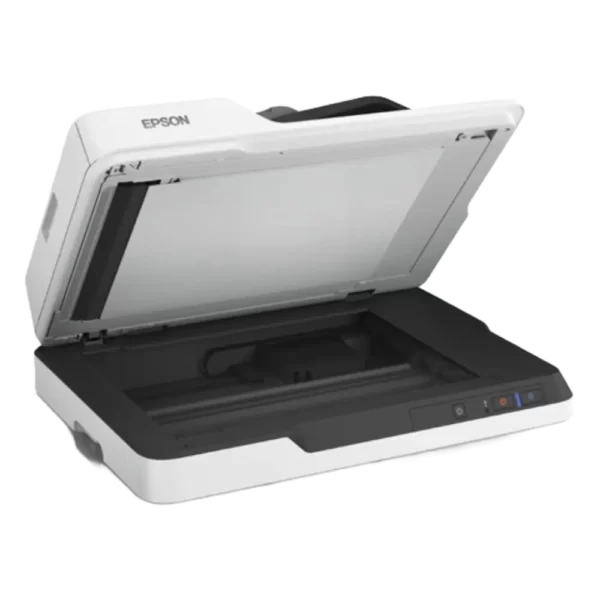
A flatbed scanner features a glass surface where documents are placed manually. It is ideal for:
- Fragile documents
- Books and magazines
- ID cards and photos
Many flatbed models also function as high-quality color scanners, making them suitable for scanning brochures, reports, and image-rich materials. For example, an Epson flatbed scanner offers high-resolution output for detailed documents and graphics.
2. Sheetfed Scanner
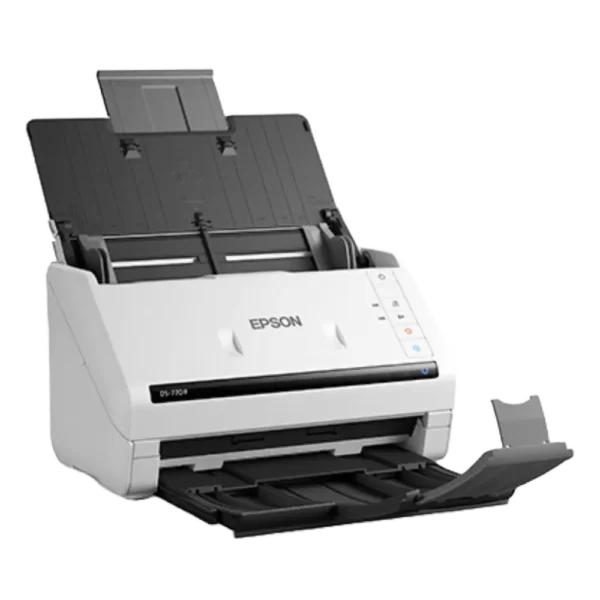
A sheetfed scanner feeds multiple pages automatically through an Automatic Document Feeder (ADF). It is perfect for:
- Bulk scanning
- Contracts and invoices
- High-volume daily tasks
Many businesses prefer sheetfed models for their speed and efficiency, especially when combined with duplex scanning. In fast-paced environments, a dedicated business scanner of this type becomes a productivity asset.
Both types support different workflows, but choosing the right one depends on office volume and document type.
How Document Scanners Improve Workflow Efficiency
Now let’s break down exactly how scanners transform daily operations.
1️. Faster Document Processing with High-Speed Scanners
Time is money in any business. A high-speed scanner dramatically reduces the time required to digitize documents.
Instead of scanning pages one by one, modern scanners can process dozens of pages per minute. For high-volume environments, a heavy-duty office scanner ensures consistent performance without slowing down operations.
For example, the Epson WorkForce WF DS-770 II Color Duplex Document Scanner is designed for fast-paced offices. As a powerful color scanner, it delivers sharp, accurate scans for contracts, reports, and marketing materials. It also represents a reliable Epson business scanner solution for organizations that demand both speed and image clarity.
Devices like this eliminate bottlenecks in accounting, HR, and administrative departments.
2. Duplex Scanning Saves Time
One of the most important features for workflow optimization is duplex scanning.
Duplex scanning allows both sides of a document to be scanned simultaneously. Without it, employees must manually flip pages — doubling the time required.
Benefits include:
- Faster contract processing
- Reduced manual handling
- Increased productivity
In high-volume offices, duplex capability is not optional — it’s essential for any serious business scanner setup.
3. Wireless Connectivity Enhances Flexibility
Modern offices demand flexibility. A wireless scanner allows documents to be scanned directly to:
- Cloud storage
- Shared folders
- Mobile devices
For example, the Epson WorkForce WF ES-500WII Wireless Duplex Document Scanner enables seamless wireless connectivity, making it ideal for hybrid and collaborative workspaces. As an Epson business scanner with wireless capability, it supports real-time sharing across departments. A wireless printer scanner setup further enhances shared access and centralized control.
Wireless functionality removes cable dependency and supports remote workflow integration.
4. Improved Document Organization with OCR and Digital Archiving
Scanning alone isn’t enough — intelligent document organization is key.
Many modern scanners include Optical Character Recognition (OCR), which converts scanned text into searchable, editable files. This enables:
- Quick document retrieval
- Digital archiving
- Reduced paper storage
- Seamless integration into document management systems
An A4 scanner is typically sufficient for standard office documents, making it the most practical choice for everyday operations. Whether you’re using a compact business scanner or a heavy-duty model, OCR transforms scanned files into accessible digital assets.
By digitizing and indexing documents, offices eliminate clutter and improve information accessibility.
5. Reduced Operational Costs
While some businesses focus only on scanner price, they often overlook long-term savings.
A document scanner reduces:
- Paper consumption
- Printing expenses
- Physical storage costs
- Administrative labor time
When evaluating Epson scanner price or overall printer and scanner price, it’s important to consider return on investment rather than just upfront cost.
Efficient scanning leads to:
- Faster approvals
- Lower administrative overhead
- Reduced duplication errors
Over time, this translates into measurable cost savings, especially when investing in a reliable Epson business scanner built for continuous use.
Dedicated Document Scanner vs All-in-One Printer
Many offices ask: Should we choose a dedicated document scanner or an all in one printer scanner?
Dedicated Document Scanner
Best for:
- High-volume scanning
- Continuous daily use
- Faster performance
- Advanced features like duplex scanning
A heavy-duty office scanner provides durability and speed for busy departments. For document-heavy organizations, a dedicated business scanner delivers more consistent results than multi-function devices.
All-in-One Printer
An all in one printer scanner or print scan copy machine combines printing, scanning, and copying. It’s ideal for:
- Small teams
- Moderate scanning needs
- Budget-conscious setups
An inkjet printer scanner is suitable for low-to-medium volume tasks, while a dedicated scanner is better for document-intensive workflows.
If scanning is central to operations, a dedicated Epson document scanner typically offers better reliability and efficiency.
Why Epson Document Scanners Are Popular for Modern Offices
The brand Epson has built a strong reputation in professional scanning solutions.
An Epson Workforce scanner is known for:
- High-speed performance
- Durable build quality
- Advanced paper handling
- Reliable duplex functionality
An Epson high-speed scanner delivers consistent results even under heavy workloads, making it ideal as a long-term business scanner solution.
Many Epson models also function as advanced color scanner systems, ensuring accurate reproduction of charts, graphics, and branded documents.
Businesses choose Epson because:
- The technology is optimized for professional environments
- Performance remains stable over time
- Scanners integrate smoothly with digital workflows
When comparing options from various scanner suppliers, Epson often stands out for balancing performance and long-term value.
Choosing the Right Scanner for Workflow Optimization
Selecting the right scanner depends on office needs.
A4 Scanner for Standard Use
Most offices work primarily with A4-sized documents. An A4 scanner is compact, efficient, and ideal for routine paperwork.
Heavy Duty Office Scanner for High Volume
If your team processes hundreds of pages daily, a heavy-duty office scanner or high-speed scanner is essential to avoid downtime. In such cases, investing in a professional business scanner ensures smoother workflow management.
Budget vs Performance
Instead of focusing only on price, evaluate:
- Scanning speed (PPM)
- Duplex capability
- Connectivity (USB vs wireless scanner)
- OCR functionality
- Brand reliability
Businesses researching Buy Scanner Online options should compare features carefully rather than relying solely on the lowest cost.
Frequently Asked Questions
1. What is the best document scanner for office use?
The best document scanner depends on the workload. High-volume offices benefit from high-speed scanners with duplex scanning, while smaller teams may prefer compact A4 business scanner models.
2. Is a high-speed scanner worth it?
Yes. A high-speed scanner significantly reduces document processing time, especially in accounting, HR, and legal departments.
3. What is duplex scanning?
Duplex scanning allows both sides of a page to be scanned in a single pass, saving time and improving efficiency.
4. Are all-in-one printers good for scanning?
An all-in-one printer scanner works well for moderate tasks. However, for frequent scanning, a dedicated business scanner is more efficient.
5. How does a document scanner reduce paper usage?
By digitizing documents and enabling digital archiving, scanners minimize printing, copying, and physical storage requirements.
Conclusion
In today’s fast-paced business environment, efficiency is no longer optional — it is essential. A modern document scanner plays a critical role in transforming traditional paper-based processes into streamlined digital workflows. From duplex scanning and wireless connectivity to high-speed scanner performance and advanced OCR, the right device can dramatically improve productivity.
Whether you are evaluating an Epson Workforce scanner, comparing Epson scanner price, or planning to buy a scanner online, always focus on features that align with your workflow needs. Consider long-term efficiency rather than just upfront cost.
For businesses looking for reliable solutions, Kepler Tech, The best epson dealers in Dubai and across the UAE, offers professional guidance and access to genuine Epson scanning technology to help optimize office productivity.
Invest wisely and let your workflow work smarter, not harder.